Organizational Tools
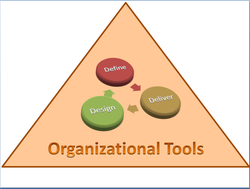
In today's digital world where multiple task are required in student learning we must begin to teach students how to function in a dynamic organizational systems These skills involve invariable adjustments to setting priorities, performing multidimensional task, evening out workloads, adjusting timeframes, prioritizing tasks and navigating networks. All of these skills in the near future will become less teacher-directed and more student-directed.
In the past teachers have taught organizational skills in a static system within a structured format. This delivery format took on the model of breaking down tasks and asking students to explicitly complete very defined units of information, such as do as I do and you will learn. A typical classroom instructional practice for developing organizational skills would include, record my notes from the board, write your name on your paper directive, or complete your assignment on time.
Classrooms of the future especially when moving over to the common core will require a more diverse approach to the development of organizational skills, especially when working in a digital environment. The purpose of this section of Organizational Tools is to provide resource information on the types of open software applications that are designed to help learners organize their digital learning environments.
In the past teachers have taught organizational skills in a static system within a structured format. This delivery format took on the model of breaking down tasks and asking students to explicitly complete very defined units of information, such as do as I do and you will learn. A typical classroom instructional practice for developing organizational skills would include, record my notes from the board, write your name on your paper directive, or complete your assignment on time.
Classrooms of the future especially when moving over to the common core will require a more diverse approach to the development of organizational skills, especially when working in a digital environment. The purpose of this section of Organizational Tools is to provide resource information on the types of open software applications that are designed to help learners organize their digital learning environments.
Symbaloo‘Symbaloo’ is a Greek verb that stands for ‘assembling’ and serves an assembly dashboard for bookmarking frequently used Web2.0 tools. Users can personalize their own set of Web 2.0 tools as a carpenter would keep their tools in a tool box. Additional tabs can be created to formulate sub categories for tools that can include frequently used sites for mixing content, storing content or generating content. In the education world Symbaloo not only serves as a book mark for frequently used Web 2.0 tools but can serve as an assignment marker for created content. Symbaloo can also serve as a tool for helping students to stay organized. Each time a student is taught how to use a new Web 2.0 resource a student can post an interactive link to their symbaloo navigation board. (See Symbaloo User Guide)
|
|
Bookmarking & OrganizingWhy maintain hyperlinks in your favorites database when you can use open source software known as “social bookmarking”? Social bookmarking is simple way you can research the web by tagging and sharing your webpage's, organize concepts and keeping track of your resources.
There are many different forms of bookmarking tools from storage of URL in categories, to posting artifacts or collection of ideas, to formulating content binders developed from a central theme. You choose a social bookmarking application service like diigo or delicious, and then bookmark your researched websites that interest you by labeling it and using keywords called tags. |
|
Delicious

Delicious is a bookmarking service that is specifically designed for saving and sharing bookmarks. It is useful tool for educators because the software application allows for the storage and categorization of hundreds of links to interesting web sites. Delicious makes it easy to store links all in one place. When used in the classroom students can publish links for other class members to use especially when developing classroom collaborative projects. The power of Delicious as an educational tool is in making bookmarks accessible to other students in a learning community, and makes everyone else’s bookmarks available to those who are invited to join the learning community. By‘tagging’ your bookmark on Delicious with brief one or two word descriptors, enables a search to be conducted across the entire site for bookmarks others have labeled with similar interest. Therefore if you have a particular interest in say ‘Literacy 2.0’, and you do a search across Delicious, you will aggregate all of the sites that have been tagged ‘Literacy 2.0’ by popularity. The process of searching by tags leads to the discovery of content rich environments where in-depth learning can occur. Delicious can be used then as a process of post holing knowledge into deeper meaning of content.
Bookmark any site on the Internet, and get to it from anywhere
Instead of having different bookmarks on every computer, Delicious makes it easy to have a single set of bookmarks kept in sync between all of your computers. Even if you're not on a computer you own, you can still ge to your bookmarks on the Delicious website.
Share your bookmarks, and get bookmarks in return
If your friends use Delicious, you can send them interesting bookmarks that they can check out the next time they log in. Of course, they can do the same for you. As you explore the site and find interesting users, you can use our Subscriptions and Network features to keep track of the Delicious tags and users you find most interesting.
Discover the most useful and interesting bookmarks on the web
See what's hot with Delicious users by checking out our popular tags. By looking at popular bookmarks for a tag, you'll be able to discover the most interesting bookmarks on the topics you're most interested in. Brows bookmarks on just about anything from the best programming tips to the most popular travel sites, all in an easy
to read format.
Bookmark any site on the Internet, and get to it from anywhere
Instead of having different bookmarks on every computer, Delicious makes it easy to have a single set of bookmarks kept in sync between all of your computers. Even if you're not on a computer you own, you can still ge to your bookmarks on the Delicious website.
Share your bookmarks, and get bookmarks in return
If your friends use Delicious, you can send them interesting bookmarks that they can check out the next time they log in. Of course, they can do the same for you. As you explore the site and find interesting users, you can use our Subscriptions and Network features to keep track of the Delicious tags and users you find most interesting.
Discover the most useful and interesting bookmarks on the web
See what's hot with Delicious users by checking out our popular tags. By looking at popular bookmarks for a tag, you'll be able to discover the most interesting bookmarks on the topics you're most interested in. Brows bookmarks on just about anything from the best programming tips to the most popular travel sites, all in an easy
to read format.
Discovery Box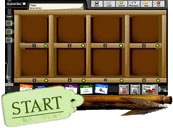
Discovery Box is a web2.0 tool that has a unique design for collecting artifacts into a virtual box . It allowsstudents to build up an argument or description of an event,person or historical period by placing digital artifacts in a virtual box. Students can display anything from a text file to a movie. Students can also access multiple discovery boxes submitted by other people and comment on the contents” as defined by its creators. Discovery Box is a great organizational tool allowing students to gather together digital resources - images, video clips, audio clips, Word documents, text files, spreadsheets, web links etc - and present them in a unique way.
|
|
LiveBinders

LiveBinders is a way for users to bookmark and showcase WebPages in a categorical format using tabs to organize web url's. The user can select a broad topic category like "Learning Support Tools" designed to help struggling students and then organize sub categories around language development through the use of tabs. It is suggested that the user install the bookmark tool to the browser by dragging a widget to the taskbar. The bookmark tool will then work the same way as any social book-marking resource, like Delicious.
After the user creates their binder a thumbnail will be created that can be stored as an active or private icon for others to view or for personal reference. LiveBinders can be used in the classroom the same way a teacher uses student binders to help organize research material by categorizing within a main topic. The edit menu allows the user to select from multiple features that include; Text Editing, Layout Options, Video Uploads, AddingCredits, Uploading Graphics, Tab Titling , and CreatingCustom Covers.
See Resource:LiveBinder Training Material.ppt
See Resource: LiveBinders Video Tutorials
See Resource: LiveBinders on Twitter
After the user creates their binder a thumbnail will be created that can be stored as an active or private icon for others to view or for personal reference. LiveBinders can be used in the classroom the same way a teacher uses student binders to help organize research material by categorizing within a main topic. The edit menu allows the user to select from multiple features that include; Text Editing, Layout Options, Video Uploads, AddingCredits, Uploading Graphics, Tab Titling , and CreatingCustom Covers.
See Resource:LiveBinder Training Material.ppt
See Resource: LiveBinders Video Tutorials
See Resource: LiveBinders on Twitter
Addtional Bookmarking Resources
Evernote Capture all sorts of digital media. Evernote indexes it and makes it searchable by keywords or tags. Works with almost any computer or mobile device.
iCyte Collaborative research tool for saving, annotating, and organizing websites and PDF files.iCyte saves entire web pages, not just a screen shot. You can also Create folders to organize your materials, and share your sites by e-mail, social networks, or by embedding. Collaborate with others. Free for teachers.
Only2Clicks Create tabs with your favorite websites, and display thumbnail images of each website. Great for visual learners!
WebList Weblist is a tool for creating visual lists of websites, displayed as thumbnails. Use Weblist to create lists of websites for students, without the distraction of the free web! Create your list of URLs centered on a specific theme to combine it into one URL. Save it as a smart bookmark or as a customizable home page, share it with friends via email or through the top social media networks, and post it on your blog.
Jog the Web Create a guide to a series of web sites. Users can create annotations and guiding questions for each page.
MiddleSpot discover, collect, and organize what you like. With a mashtab you can collect webpages, images, music, videos, web widgets, files, documents, code, and more in one central spot. You can add, annotate, cluster, layer, pan, resize, tweet and share the content you've collected. A mashtab makes a great start page or personal collection of interests.
iCyte Collaborative research tool for saving, annotating, and organizing websites and PDF files.iCyte saves entire web pages, not just a screen shot. You can also Create folders to organize your materials, and share your sites by e-mail, social networks, or by embedding. Collaborate with others. Free for teachers.
Only2Clicks Create tabs with your favorite websites, and display thumbnail images of each website. Great for visual learners!
WebList Weblist is a tool for creating visual lists of websites, displayed as thumbnails. Use Weblist to create lists of websites for students, without the distraction of the free web! Create your list of URLs centered on a specific theme to combine it into one URL. Save it as a smart bookmark or as a customizable home page, share it with friends via email or through the top social media networks, and post it on your blog.
Jog the Web Create a guide to a series of web sites. Users can create annotations and guiding questions for each page.
MiddleSpot discover, collect, and organize what you like. With a mashtab you can collect webpages, images, music, videos, web widgets, files, documents, code, and more in one central spot. You can add, annotate, cluster, layer, pan, resize, tweet and share the content you've collected. A mashtab makes a great start page or personal collection of interests.